
1. Pengenalan
Terima kasih kerana membeliasing the JVC RX-5000R AV Receiver. This manual provides detailed instructions for the proper setup, operation, and maintenance of your receiver. Please read this manual thoroughly before using the unit to ensure optimal performance and safety.
The JVC RX-5000R is an advanced audio/video receiver designed to deliver high-quality sound for your home entertainment system. It features Dolby Surround Pro Logic compatibility, providing 100 watts of output power per channel across five channels. With its 5 separate power amplebih hidup stages and 5.1-channel analog input, it supports multi-channel audio formats like Dolby Digital. The integrated RDS tuner allows for convenient radio listening with memory for up to 30 FM and 15 MW/LW stations. The receiver also includes a subwoofer output and 5 audio inputs for connecting various devices. A remote control is included for ease of use.
2. Maklumat Keselamatan Penting
Always follow these basic safety precautions when using your JVC RX-5000R AV Receiver to reduce the risk of fire, electric shock, and injury:
- Sumber Kuasa: Sambungkan unit hanya kepada saluran keluar AC voltage dinyatakan pada panel belakang.
- Pengudaraan: Ensure adequate ventilation. Do not block ventilation openings. Allow sufficient space around the unit for proper airflow.
- Air dan Kelembapan: Jangan dedahkan unit kepada hujan atau lembapan. Jangan letakkan objek yang diisi dengan cecair, seperti pasu, pada unit.
- haba: Jauhkan unit daripada sumber haba seperti radiator, daftar haba, dapur, atau radas lain (termasuk amppenghidup) yang menghasilkan haba.
- Pembersihan: Cabut palam unit dari salur keluar dinding sebelum membersihkan. Gunakan kain kering untuk pembersihan.
- Servis: Jangan cuba servis produk ini sendiri. Rujuk semua perkhidmatan kepada pegawai perkhidmatan yang berkelayakan.
- kilat: Cabut palam unit semasa ribut petir atau apabila tidak digunakan untuk tempoh yang lama.
3. Persediaan dan Sambungan
This section guides you through connecting your JVC RX-5000R AV Receiver to your speakers, audio sources, and power supply.
3.1 Membongkar
Carefully remove the receiver and all accessories from the packaging. Verify that all components are present:
- JVC RX-5000R AV Receiver
- Alat Kawalan Jauh
- Antena FM
- Antena Gelung AM
- Kord Kuasa
- Manual Arahan (dokumen ini)
3.2 Sambungan Pembesar Suara
The RX-5000R supports a 5.1 channel speaker configuration. Connect your speakers as follows:
- Front Speakers (Left/Right): Sambungkan ke terminal L/R HADAPAN.
- Penceramah Pusat: Sambungkan ke terminal PUSAT.
- Surround Speakers (Left/Right): Sambungkan ke terminal SURROUND L/R.
- subwufer: Sambungkan subwoofer aktif ke bicu SUBWOOFER PRE OUT.
Nota: Ensure correct polarity (+ to + and - to -) for all speaker connections to prevent phase issues and ensure optimal sound quality.
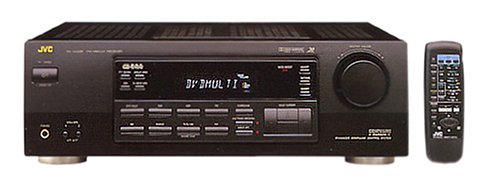
Figure 1: Rear panel of the JVC RX-5000R showing speaker and audio input terminals. This image illustrates the various connection points for speakers and external audio devices.
3.3 Sambungan Sumber Audio
Connect your audio components (CD player, DVD player, TV, etc.) to the appropriate audio input jacks on the rear panel.
- Input Audio Analog: The receiver features 5 analog audio inputs. Use RCA cables to connect your devices to these inputs (e.g., CD, TAPE, VCR, DVD, TV).
- Input Audio Digital: The receiver supports Optical and Coaxial digital audio inputs. Connect compatible devices (e.g., DVD player, game console) to these inputs for high-quality digital sound.
- 5.1 Channel Analog Input: For devices with multi-channel analog outputs (e.g., older DVD players with built-in Dolby Digital/DTS decoders), connect to the 5.1 CH INPUT jacks.
3.4 Sambungan Antena
Sambungkan antena FM dan AM yang dibekalkan untuk penerimaan radio.
- Antena FM: Connect the FM wire antenna to the FM 75Ω COAXIAL terminal. Extend the wire for best reception.
- Antena AM: Assemble the AM loop antenna and connect its wires to the AM terminals. Position the antenna for optimal reception.
3.5 Sambungan Kuasa
After all audio and speaker connections are made, connect the power cord to the AC inlet on the receiver and then to a wall outlet.
4. Operasi Asas
This section covers the fundamental operations of your JVC RX-5000R AV Receiver.
4.1 Hidupkan/Mati Kuasa
Tekan ke KUASA butang pada panel hadapan atau alat kawalan jauh untuk menghidupkan atau mematikan penerima.
4.2 Pemilihan Input
Gunakan PEMILIH INPUT knob on the front panel or the corresponding input buttons (e.g., CD, DVD, TV/VCR) on the remote control to select your desired audio source.
4.3 Kawalan Kelantangan
Laraskan kelantangan induk menggunakan besar JILID tombol pada panel hadapan atau pada JILID +/- butang pada alat kawalan jauh.
4.4 Sound Mode Selection
The RX-5000R offers various sound modes, including Dolby Surround Pro Logic. Press the MODUL SUARA button on the remote control or front panel to cycle through available modes and select the one best suited for your content.
4.5 Tuner Operation (RDS)
Untuk mendengar radio:
- Pilih TUNER input.
- Tekan BAND to select FM or AM.
- Gunakan PENALAAN +/- buttons to manually tune to a station or AUTO TALA to scan for stations.
- To store a station, press MEMORI, kemudian gunakan PRESET +/- butang untuk memilih nombor pratetap, dan tekan MEMORI again to confirm. The receiver supports up to 30 FM and 15 MW/LW presets.
- The RDS (Radio Data System) feature, if available on the broadcast, will display station information such as program type or station name.
5. Penyelenggaraan
Proper care and maintenance will ensure the longevity and optimal performance of your JVC RX-5000R AV Receiver.
- Membersihkan Unit: Disconnect the power cord before cleaning. Use a soft, dry cloth to wipe the exterior surfaces. Do not use abrasive cleaners, waxes, or solvents as they may damage the finish.
- Pengudaraan: Regularly check that the ventilation openings are not obstructed by dust or debris. Blocked vents can lead to overheating.
- Kord Kuasa: Inspect the power cord periodically for any signs of damage. If damaged, contact qualified service personnel for replacement.
- Storan: Jika menyimpan unit ini untuk tempoh yang lama, cabut kabelnya dari soket kuasa dan simpan di tempat yang sejuk dan kering, jauh daripada cahaya matahari langsung dan suhu yang melampau.
6. Penyelesaian masalah
Before contacting service personnel, please refer to the following table for common issues and their solutions.
| Masalah | Kemungkinan Punca | Penyelesaian |
|---|---|---|
| Tiada kuasa | Kord kuasa tidak disambungkan dengan selamat. Soket kuasa tidak aktif. | Ensure the power cord is firmly plugged into the receiver and the wall outlet. Uji saluran keluar dengan peranti lain. |
| Tiada bunyi | Input salah dipilih. Speaker wires are loose or incorrectly connected. Kelantangan terlalu rendah atau diredamkan. Source device is not playing or has low volume. | Pilih sumber input yang betul. Periksa semua sambungan pembesar suara untuk kekutuban yang betul dan kesesuaian yang selamat. Increase volume and check if MUTE is active. Ensure the source device is playing and its volume is adequate. |
| Penerimaan radio yang lemah | Antena tidak disambungkan atau diletakkan dengan betul. Gangguan daripada peranti elektronik lain. | Adjust the position and orientation of the FM and AM antennas. Move the receiver or antennas away from other electronic devices. |
| Alat kawalan jauh tidak berfungsi | Bateri habis atau salah dimasukkan. Halangan antara alat kawalan jauh dan penerima. | Gantikan bateri dengan yang baharu, memastikan kekutuban yang betul. Remove any obstacles and ensure the remote is pointed at the receiver's sensor. |
7. Spesifikasi
Spesifikasi ini tertakluk kepada perubahan tanpa notis.
- model: JVC RX-5000R
- Kuasa Output: 100 Watts per channel (5 channels)
- Saluran Audio: 5.1 Bunyi Sekeliling
- Konfigurasi Bunyi Sekeliling: 5.1
- Mod Output Audio: Keliling
- Teknologi Ketersambungan: Optical, Coaxial, 3.5 mm jack (for audio inputs)
- Input Audio: 5 Analog Audio Inputs, 5.1 Channel Analog Input, Digital Optical, Digital Coaxial
- Penala: RDS (Radio Data System) compatible FM/AM tuner
- Pratetap Penala: 30 FM, 15 MW/LW
- Jenis Kawalan: Push button, Remote control
- Peranti Serasi: Television, CD players, DVD players, etc.
- Pengeluar: JVC
Note: The listed "Aantal HDMI-poorten: 5" in some product data refers to general input count and not necessarily HDMI video ports for this model. This receiver primarily handles audio and older video signals via analog connections.
8. Waranti dan Sokongan Pelanggan
JVC products are manufactured to the highest quality standards. For warranty information, please refer to the separate warranty card included with your product or visit the official JVC webtapak untuk wilayah anda.
For technical assistance, troubleshooting beyond this manual, or service inquiries, please contact JVC customer support. Contact details can typically be found on the official JVC webtapak atau dalam pembungkusan produk anda.
When contacting support, please have your model number (RX-5000R) and serial number ready.