
1. Pengenalan
The Pentax IQ Zoom 160 is a compact 35mm film camera designed for ease of use and versatility. It features a powerful 38-160mm zoom lens, an advanced autofocus system, and various shooting modes to capture a wide range of photographic situations. This manual provides detailed instructions for the proper operation and care of your camera.

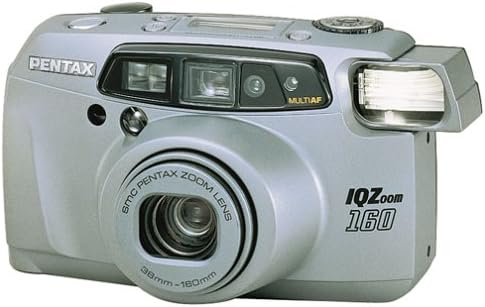
Rajah 1: Depan view of the Pentax IQ Zoom 160 camera, showing the lens, flash, and viewpencari.
Ciri-ciri Utama:
- 38-160mm power zoom lens for versatile framing.
- Five-point passive autofocus system for precise focusing.
- Six-segment multipattern metering system for optimal exposure.
- Automatic backlight compensation.
- Actual-image zoom viewfinder with diopter adjustment.
- Panorama mode for wide-angle shots.
- Multiexposure mode for creative effects.
- Self-timer function.
- Easy-to-read LCD instruction panel with automatic illumination.
2. Persediaan
2.1. Pemasangan Bateri
The Pentax IQ Zoom 160 requires one 3V Lithium battery, type CR123A or SF123A. Ensure the battery is inserted with the correct polarity as indicated inside the battery compartment.
- Cari penutup petak bateri di bahagian bawah kamera.
- Slide or twist the cover latch to open the compartment.
- Insert one CR123A/SF123A battery, matching the (+) and (-) terminals with the indicators.
- Tutup penutup petak bateri dengan selamat sehingga ia berbunyi klik pada tempatnya.
Rajah 2: Bawah view of the camera, showing the battery compartment and tripod mount.
2.2. Memuatkan Filem
The camera uses standard 35mm film rolls. Always load film in subdued light to prevent accidental exposure.
- Open the camera back by sliding the film door release latch (usually on the side or top of the camera).
- Place a new 35mm film cartridge into the film chamber on the left side.
- Pull the film leader across to the film take-up spool on the right side, ensuring it catches on the spool's teeth.
- Close the camera back firmly until it latches. The camera will automatically advance the film to the first frame. The exposure counter on the LCD panel will display "1".

Rajah 3: Belakang view of the camera, showing the viewfinder and film door release.
3. Mengendalikan Kamera
3.1. Hidupkan/Mati Kuasa dan Pemilihan Mod
The user-friendly mode dial allows you to turn the camera on and off, and select various shooting modes.

Rajah 4: Atas view of the camera, highlighting the mode dial and LCD instruction panel.
- Hidupkan kuasa: Rotate the mode dial from "OFF" to any desired shooting mode (e.g., Auto). The lens will extend.
- Matikan: Rotate the mode dial to "OFF". The lens will retract.
- Mode Dial Settings: The dial typically includes modes such as Auto, Red-eye Reduction, Flash Off, Self-timer, and Multiexposure. Refer to the icons on the dial for specific functions.
3.2. Mengambil Gambar
- Aim the Camera: Lihat melalui viewpencari dan bingkaikan subjek anda.
- Zum: Use the zoom buttons (usually marked 'W' for Wide and 'T' for Telephoto) to adjust the focal length of the 38-160mm lens.
- Fokus: Lightly press the shutter button halfway down. The camera's five-point passive autofocus system will focus on the subject. A focus indicator in the viewPencari akan mengesahkan fokus.
- Tembak: Tekan butang pengatup ke bawah sepenuhnya untuk mengambil gambar.
3.3. Mod Denyar
The built-in flash provides illumination in low-light conditions. The camera features automatic backlight compensation, firing the flash when necessary to properly expose the subject.
- Denyar Automatik: The camera automatically determines if flash is needed.
- Pengurangan mata merah: Fires a pre-flash before the main flash to reduce red-eye effect.
- Kilat Dimatikan: Prevents the flash from firing, useful in situations where flash is prohibited or undesirable.
3.4. Special Shooting Functions
- Mod Panorama: Switch to panorama mode via the mode dial or a dedicated button. The viewfinder will adjust to show the panorama framing area. This mode allows for wider aspect ratio images.
- Pemasa kendiri: Activate the self-timer (typically 10 seconds) using the mode dial or a dedicated button. The camera will delay taking the picture, allowing the photographer to be included in the shot.
- Multiexposure Mode: This creative mode allows you to combine two or more exposures onto a single frame of film. Consult the LCD instruction panel for guidance on activating and using this feature.
3.5. Viewfinder and LCD Panel
The actual-image zoom viewfinder provides a clear view of your subject and includes a diopter adjustment for users with varying eyesight. The large LCD instruction panel displays essential camera settings and indicators, such as exposure counter, battery exhaustion warning, flash status, and selected mode. It automatically lights up for visibility in any lighting condition.
4. Penyelenggaraan
4.1. Membersihkan Kamera
- Kanta: Use a soft, lint-free cloth or a lens brush to gently remove dust. For smudges, use a specialized lens cleaning solution and cloth. Avoid touching the lens surface with your fingers.
- Badan Kamera: Lap badan kamera dengan kain lembut dan kering. Untuk kotoran degil, sedikit dampLap kain dengan air. Jangan gunakan pelarut atau pembersih yang kasar.
- Viewpencari: Use a soft brush or air blower to remove dust from the viewkanta mata pencari.
4.2. Penyimpanan
- Apabila tidak digunakan untuk tempoh yang lama, tanggalkan bateri untuk mengelakkan kebocoran.
- Store the camera in a cool, dry place, away from direct sunlight, high humidity, and extreme temperatures.
- Gunakan beg atau sarung kamera untuk melindungi kamera daripada habuk dan kerosakan fizikal.
5. Penyelesaian masalah
| Masalah | Penyelesaian | |
|---|---|---|
| Kamera tidak dihidupkan. | Bateri mati atau dimasukkan dengan salah. | Replace battery with a fresh CR123A/SF123A, ensuring correct polarity. |
| Filem tidak maju. | Film not properly loaded or end of roll. | Re-load film, ensuring the leader catches the take-up spool. Check if the film counter shows 'S' or 'E'. |
| Gambar kabur. | Camera shake, subject too close, or focus error. | Hold camera steady, ensure subject is within focusing range, or use a tripod. Ensure focus confirmation appears before shooting. |
| Flash tidak menyala. | Flash is set to "Flash Off" mode or battery is low. | Check flash mode setting. Replace battery if low. |
| Mata merah dalam foto. | Flash fired directly at subject's eyes. | Use Red-eye Reduction flash mode. Increase ambient lighting if possible. |
6. Spesifikasi
| Umum | |
|---|---|
| Jenama | Pentax |
| Nama Model | IQ Zoom 160 |
| Nombor Model | 10124 |
| Faktor Bentuk | Padat |
| Berat Barang | 16 auns |
| Bahan Kepungan | plastik |
| Lensa | |
| Jenis Kanta | Zum |
| Panjang Fokus Minimum | 38 Milimeter |
| Panjang Fokus Maksimum | 160 Milimeter |
| Aperture minimum | 4.5 |
| Mod Apertur | 4.5-12 |
| Exposure & Focus | |
| Kawalan Pendedahan | Automatik |
| Kaedah Pemeteran | Spot, Multi-pattern |
| Kelajuan Pengatup Minimum | 1/400 saat |
| Kelajuan Pengatup Maksimum | 2 saat |
| Teknologi Fokus Auto | Contrast Detection, Multi area, sensor |
| Mata Autofokus | 5 |
| Mod Fokus | Single-Servo AF (AF-S) |
| Tetapan Imbangan Putih | Auto |
| Minimum ISO Dikembangkan | 100 |
| kilat | |
| Denyar Kamera | Terbina Dalam |
| Mod Flash | Automatic, Red Eye Reduction |
| Kelajuan Penyegerakan Denyar | 1/400 saat |
| Ciri-ciri lain | |
| Viewpencari | Optik |
| Jenis Paparan | LCD |
| Pemasa Kendiri | 10 Saat |
| Mod Penangkapan | Automatic, Panorama, Multiexposure, Self-timer |
| Ciri Khas | Panorama |
| Jenis Bateri | 3V Lithium CR123A/SF123A |
| Tahap Ketahanan Air | Bukan Tahan Air |
| Mempunyai Penstabilan Imej | Tidak |
7. Waranti dan Sokongan
For specific warranty information, please refer to the documentation included with your purchase or visit the official Pentax website. For technical support or service inquiries, please contact Pentax customer service directly.
You can often find additional support resources, FAQs, and contact information on the manufacturer's official webtapak.