
pengenalan
The RCA CC9370 AutoShot Digital MiniDV Camcorder is designed for recording high-quality digital video and capturing still images. Featuring a 680,000-pixel CCD for clear resolution, a swiveling 3-inch color LCD monitor for flexible operation, and a 10x optical/250x digital zoom lens, this camcorder is equipped for various recording scenarios. Built-in image stabilization helps maintain steady footage. This manual provides essential information for setting up, operating, maintaining, and troubleshooting your camcorder.
Apa yang ada dalam Kotak
Sahkan bahawa semua item terdapat dalam pakej:
- RCA CC9370 AutoShot Digital MiniDV Camcorder
- Kabel USB
- Manual Pengguna (dokumen ini)
Produk Selesaiview

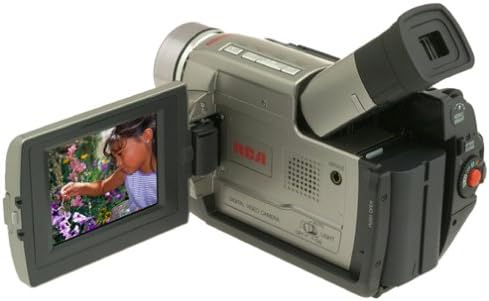
The RCA CC9370 camcorder shown with its 3-inch LCD screen open, displaying a vibrant image. This view highlights the camcorder's compact design and the flexibility of the swiveling screen.
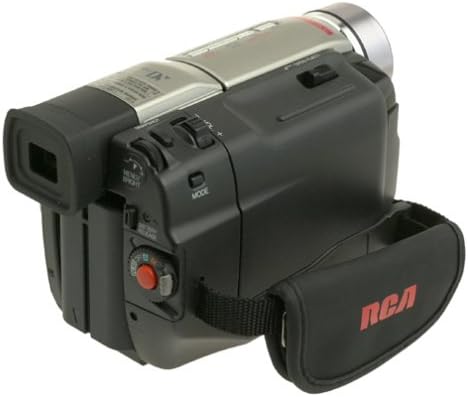
Satu sisi view of the RCA CC9370 camcorder, illustrating the ergonomic hand strap for secure gripping and various control buttons for easy access during operation.
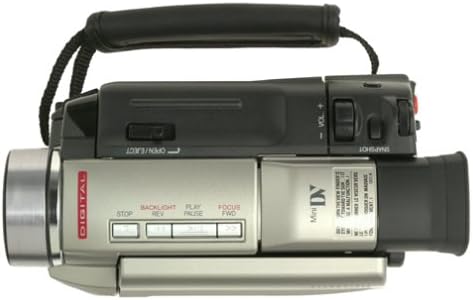
This image provides a top-down perspective of the camcorder, showcasing the lens barrel and the layout of the top-mounted controls, including zoom and recording buttons.
Bahagian hadapan view of the RCA CC9370 camcorder, focusing on the lens assembly and the front panel design, which includes the microphone and other indicators.
Persediaan
1. Pemasangan Bateri
- Pastikan camcorder dimatikan.
- Cari petak bateri di bahagian belakang camcorder.
- Luncurkan bateri ke dalam petak sehingga ia mengklik dengan selamat ke tempatnya.
- Untuk mengeluarkan, tekan tuil pelepas bateri dan luncurkan bateri keluar.
2. MiniDV Tape Insertion
- Open the tape compartment door, typically located on the top or side of the camcorder.
- Insert a MiniDV cassette with the window facing outwards and the tape reel side oriented correctly.
- Gently push the cassette until it seats properly, then close the compartment door.
3. Kuasa Awal Hidup
- Connect the AC adapter or ensure the battery is charged.
- Set the POWER switch to the 'ON' or 'CAMERA' position.
- Open the LCD monitor or pull out the viewfinder to activate the display.
Mengendalikan Camcorder
Rakaman Video
- Hidupkan kuasa: Turn the camcorder on and select 'CAMERA' mode.
- Pembingkaian: Use the 3-inch swiveling LCD monitor or viewpencari untuk membingkai pukulan anda.
- Zum: Use the zoom lever to adjust between 10x optical and 250x digital zoom.
- Penstabilan Imej: The built-in image stabilization system helps reduce camera shake during recording.
- Mula/Hentikan Rakaman: Press the RECORD button to begin and end recording.
Digital Still Camera Function
The camcorder can capture still images at 640 x 480 resolution. These images are stored directly onto the digital videotape. To transfer them to a PC, use the provided serial cable and compatible software.
Digital Effects and Scene Transitions
Enhance your recordings with various digital effects and scene transitions. Options may include classic film, strobe, slow shutter, and black and white. Refer to the on-screen menu for selection and application.
Main balik
- Mod Main Semula: Switch the camcorder to 'VCR' or 'PLAY' mode.
- Kawalan: Use the PLAY, STOP, REWIND, and FAST FORWARD buttons to navigate your recordings.
- Playback Zoom: Utilize the playback zoom feature for enhanced viewing of recorded footage.
- Random-Assemble Editing: This feature allows you to mark and recall up to eight favorite scenes for review or basic editing.
Connecting to a Computer or TV
Menyambung ke Komputer
- For Still Images: Use the provided serial cable to connect the camcorder to your PC. Install any necessary drivers or software for image transfer.
- Untuk Video: The camcorder includes an IEEE 1394 (FireWire) port and cable for digital video transfer to compatible computers and editing devices.
Connecting to a Television
Connect the camcorder to a television using either standard analog AV connectors (RCA composite) or an S-video connector for video playback on a larger screen.
Penyelenggaraan
- Membersihkan Lensa: Use a soft, lint-free cloth specifically designed for optical lenses to gently clean the camcorder lens. Avoid harsh chemicals.
- Membersihkan Badan: Wipe the camcorder body with a soft, dry cloth. Do not use solvents or abrasive cleaners.
- Penjagaan Bateri: Store batteries in a cool, dry place. Fully charge batteries before extended use and discharge them periodically if storing for long periods.
- Penyimpanan Pita: Store MiniDV tapes in their cases, away from direct sunlight, high temperatures, and strong magnetic fields.
- Storan Umum: When not in use, store the camcorder in a protective bag or case to prevent dust and damage.
Menyelesaikan masalah
| Masalah | Kemungkinan Punca | Penyelesaian |
|---|---|---|
| Camcorder tidak dihidupkan. | Battery is discharged or not inserted correctly. AC adapter not connected. | Charge the battery or ensure it is properly seated. Connect the AC adapter. |
| Tiada imej pada LCD/viewpencari. | LCD/viewfinder not open or activated. Power saving mode. | Open the LCD or pull out the viewfinder. Check power saving settings. |
| Kualiti video yang teruk. | Lens is dirty. Insufficient lighting. Image stabilization off. | Clean the lens. Record in better lighting conditions. Ensure image stabilization is active. |
| Cannot transfer still images to PC. | Incorrect cable connection. Missing drivers/software. | Ensure serial cable is securely connected. Install necessary drivers and software. |
Spesifikasi
| Ciri | Perincian |
|---|---|
| Jenama | RCA |
| Nombor Model | CC9370 |
| Teknologi Penderia Foto | CCD |
| Resolusi Tangkapan Video | 480p |
| Resolusi Imej Pegun | 640 x 480 (stored on videotape) |
| Saiz Skrin | 3 Inches (swiveling color LCD) |
| Zum Optik | 10x |
| Zum Digital | 250x |
| Penstabilan Imej | digital |
| Teknologi Ketersambungan | RCA (Analog AV), S-Video, IEEE 1394 (FireWire), Serial (for still images) |
| Purata Hayat Bateri | 1 Jam |
| Berat Barang | 3.18 paun |
| warna | Hitam, Perak |
Maklumat Waranti
This RCA CC9370 AutoShot Digital MiniDV Camcorder comes with a warranty covering 1 year for parts and 90 days for labor from the date of purchase. Please retain your proof of purchase for warranty claims. This warranty covers manufacturing defects and does not cover damage caused by misuse, accidents, or unauthorized modifications.
Sokongan
For further assistance, technical support, or warranty service, please refer to the contact information provided with your product packaging or visit the official RCA support website. Ensure you have your model number (CC9370) and proof of purchase available when contacting support.