
Casio HR-8L
Manual Pengguna Kalkulator Percetakan Genggam Casio HR-8L
Model: HR-8L
pengenalan
This manual provides instructions for the proper setup, operation, maintenance, and troubleshooting of your Casio HR-8L Handheld Printing Calculator. Please read this manual thoroughly before using the calculator to ensure optimal performance and longevity.
The Casio HR-8L is a portable printing calculator designed for quick and accurate computations, suitable for various environments including office and personal use. It features a 10-digit display and a printing mechanism for transaction records.
Produk Selesaiview
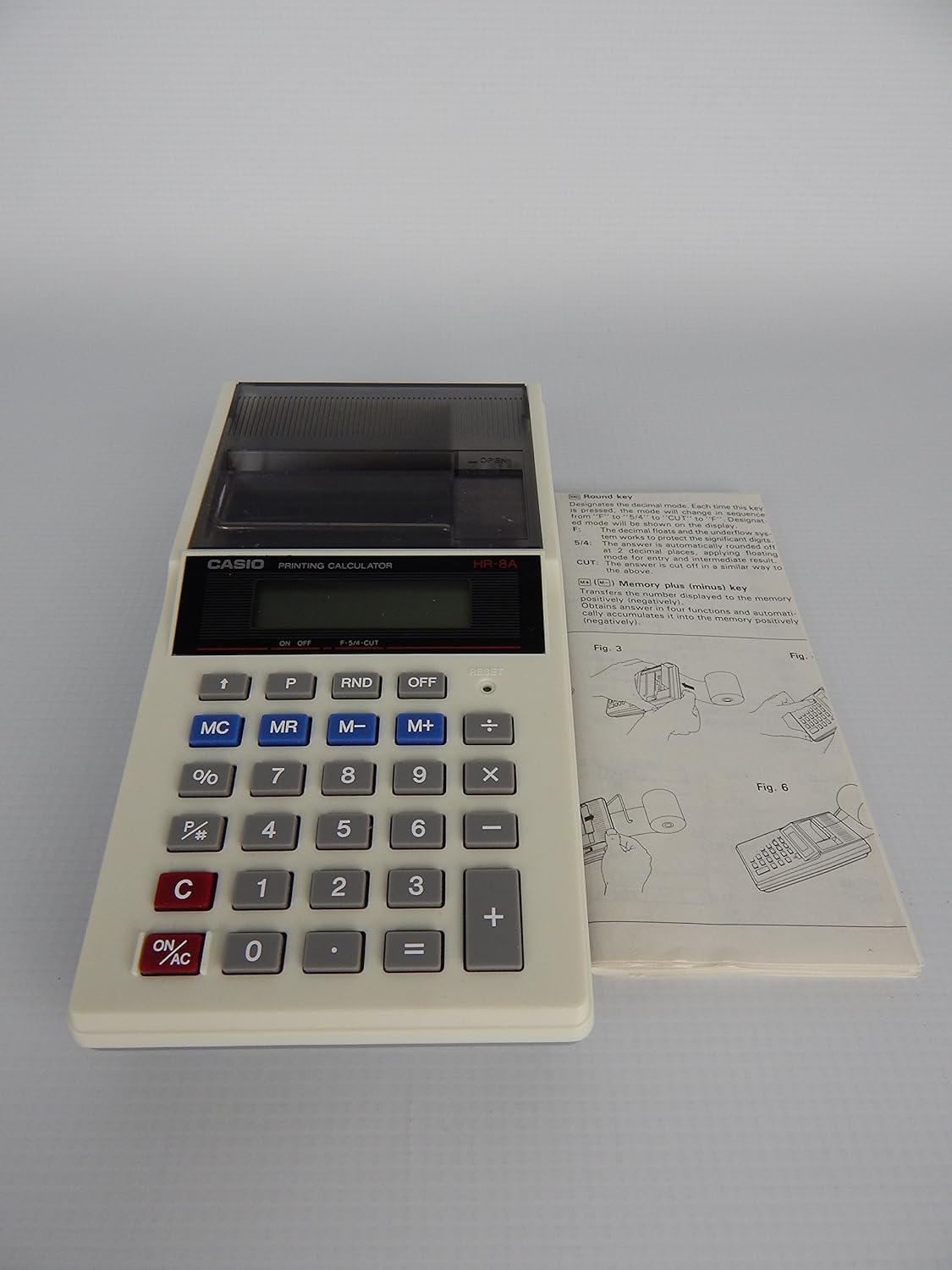
Rajah 1: Casio HR-8L Handheld Printing Calculator shown with its accompanying instruction manual. This image provides a general view of the calculator's design and its compact size, highlighting the key layout and the paper roll compartment.

Rajah 2: A top-down perspective of the Casio HR-8L Handheld Printing Calculator, emphasizing the display screen, key arrangement, and the integrated paper roll cover. This view helps in identifying the various functional buttons.

Rajah 3: The Casio HR-8L Handheld Printing Calculator in operation, demonstrating the paper roll extending from the top. This image illustrates the printing capability and the visibility of the printed calculations on the paper tape.
Persediaan
1. Sumber Kuasa
The Casio HR-8L operates on four (4) AA batteries. Ensure fresh batteries are installed correctly according to the polarity markings in the battery compartment. The unit can also be powered by an optional power supply (not included).
2. Memasang Gulungan Kertas
- Open the paper roll compartment cover.
- Place a new 2.25-inch width paper roll into the compartment, ensuring the paper feeds from the bottom of the roll.
- Feed the leading edge of the paper through the printer slot until it emerges from the top.
- Close the paper roll compartment cover.
- Tekan ke AUTO SUAPAN button to advance the paper roll if needed.
Arahan Operasi
Operasi Asas
- HIDUP/MATI Kuasa: Tekan ke HIDUP/AC button to turn the calculator on and clear all entries. Press the DIMATIKAN butang untuk mematikannya.
- Entri Nombor: Use the numeric keypad (0-9) to enter numbers.
- Operasi Aritmetik: Gunakan +, -, ×, ÷ keys for addition, subtraction, multiplication, and division.
- sama dengan: Tekan ke = key to display the result of a calculation.
- Kosongkan Entri: Tekan ke C key to clear the last entered number or operation.
- Sistem Perpuluhan: The calculator supports a full decimal system, including options for floating, fixed (0 to 3) with round-off, and cut-off modes. Refer to the original manual for specific key combinations for these settings.
Fungsi Memori
- Kosongkan Memori (MC): Clears the memory content.
- Ingatan Ingatan (MR): Recalls the memory content to the display.
- Memori Tolak (M-): Subtracts the displayed value from the memory content.
- Memori Plus (M+): Adds the displayed value to the memory content.
Fungsi Khas
- Peratustage (%): Mengira peratustages.
- Markup/Markdown: Use the dedicated key for markup/markdown calculations.
- Pengiraan Masa: The calculator supports time-related calculations.
- Function Command Sign: A function command sign appears in the display to indicate the current operation.
Penyelenggaraan
Pembersihan
To clean the calculator, wipe the exterior with a soft, dry cloth. For stubborn dirt, a slightly damp cloth can be used, but ensure no moisture enters the device. Do not use abrasive cleaners or solvents.
Penggantian Bateri
When the display dims or printing becomes faint, it is time to replace the batteries. Turn off the calculator, open the battery compartment, remove the old batteries, and insert new AA batteries, observing correct polarity. Dispose of old batteries responsibly.
Penggantian Gulungan Kertas
Replace the paper roll when it runs out, following the instructions in the "Setup" section. Use only 2.25-inch width paper rolls designed for printing calculators.
Menyelesaikan masalah
| Masalah | Kemungkinan Punca | Penyelesaian |
|---|---|---|
| Kalkulator tidak boleh dihidupkan. | Bateri mati atau tidak dipasang dengan betul. | Replace batteries with new ones, ensuring correct polarity. Check if an optional power supply is connected and functioning. |
| Paparan malap atau kosong. | Kuasa bateri rendah. | Gantikan bateri. |
| Printer is not printing or print is faint. | No paper, paper jammed, or low battery. | Check paper roll and ensure it is installed correctly. Clear any paper jams. Replace batteries. |
| Keputusan pengiraan yang salah. | Incorrect input or decimal settings. | Review your input sequence. Check decimal settings (floating, fixed, round-off, cut-off). Press HIDUP/AC to clear and restart. |
Spesifikasi
- model: HR-8L
- paparan: LCD 10 digit
- Kelajuan Mencetak: 1.6 baris sesaat
- Paper Roll Width: 2.25 inches (dual paper roll system)
- Sumber Kuasa: 4 x AA batteries or optional AC adapter
- Dimensi (lebih kurang): 1.5 x 3.6 x 7.5 inci (H x W x D)
- Berat (lebih kurang): 10.5 auns (tanpa bateri)
- Fungsi: Basic arithmetic, percentage, memory (MC, MR, M-, M+), markup/markdown, time calculations, full decimal system (floating, fixed 0-3 with round-off/cut-off).
Maklumat Waranti
Casio products typically come with a limited manufacturer's warranty. For specific warranty terms and conditions, including duration and coverage, please refer to the warranty card included with your product packaging or visit the official Casio webtapak. Simpan bukti pembelian anda untuk tuntutan waranti.
Sokongan Pelanggan
For further assistance, technical support, or inquiries regarding your Casio HR-8L calculator, please visit the official Casio support webtapak atau hubungi bahagian perkhidmatan pelanggan mereka. Maklumat hubungan biasanya boleh didapati di Casio webtapak atau dalam pembungkusan produk.
Anda boleh layari Kedai Casio untuk maklumat lanjut: Kedai Kalkulator Casio
Ask a question about this manual
Ask about setup, troubleshooting, compatibility, parts, safety, or missing instructions. Manuals+ will review the question and use this page’s manual context to help answer it.